
Automating SOC 2 evidence collection with AI and browser automation
Evidence collection is the real bottleneck in SOC 2 Type 2 audits. At Tallyfy, an AI-assisted process with Playwright browser automation collected 99 evidence items across 4 sessions, using date-first naming conventions and typed evidence categories instead of expensive compliance platforms.
If you remember nothing else:
- Evidence collection is the most time-consuming part of SOC 2 Type 2, not the audit itself
- A consistent naming convention (date-first) eliminates half the organizational headache
- AI-assisted sessions collected 99 evidence items in 4 sessions spanning 4 days
- Different evidence types (screenshots, exports, attestations) need different collection mechanics
Worth discussing for your situation?
Reach out
.
Honestly, the worst part of SOC 2 Type 2 is not the audit. It is the quarterly evidence collection cycle that nobody warns you about.
The audit itself is straightforward. Your CPA firm reviews what you hand them, tests a sample of controls, and writes a report. That part takes weeks. The evidence collection? That’s the thing eating months of your year, every year, forever.
Industry surveys consistently find that organizations spend over 1,000 hours on compliance activities. Most of those hours aren’t spent in meetings with auditors. They’re spent logging into AWS consoles, taking screenshots of IAM configurations, exporting user lists from identity providers, and naming files in a way that someone can find them six months later. It’s administrative work that feels important because it is important, but it doesn’t require deep thinking. It requires consistency and patience.
At Tallyfy, we’ve been running this cycle for years now. Our most recent audit period covered March 2025 through February 2026. When evidence collection kicked off on March 8th, we ran four AI-assisted sessions over four days and collected 99 items. Not because the work was easy, but because the process had been refined to the point where an AI agent could handle the repetitive parts while a human verified and approved.
This is the mechanical, detailed post about how that actually works. If you want the higher-level view of how we replaced our compliance platform entirely, that’s a separate read.
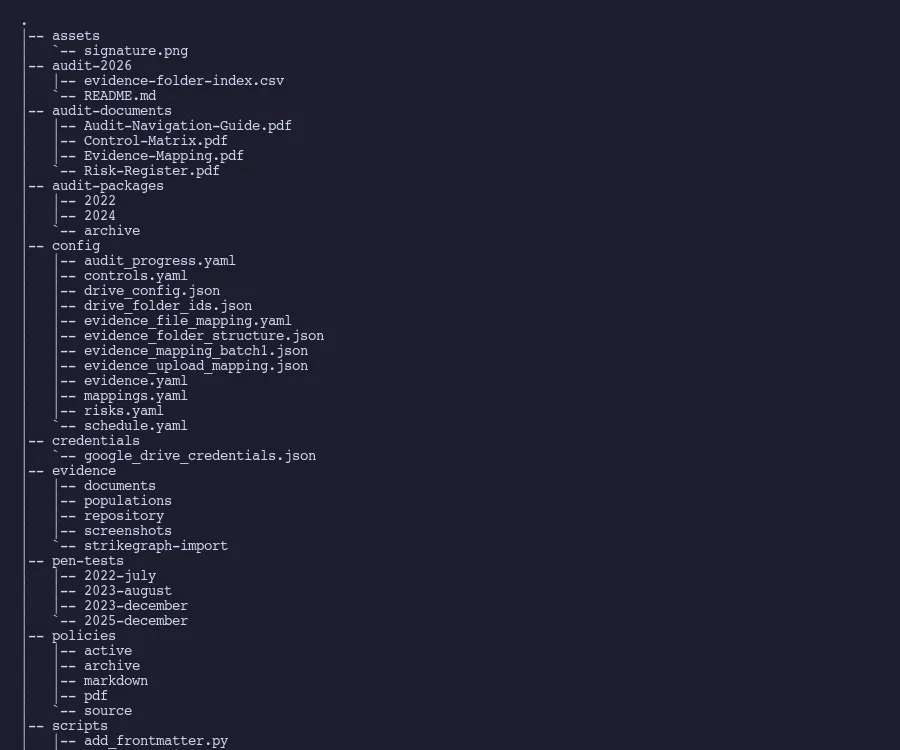
Why evidence collection is the real bottleneck
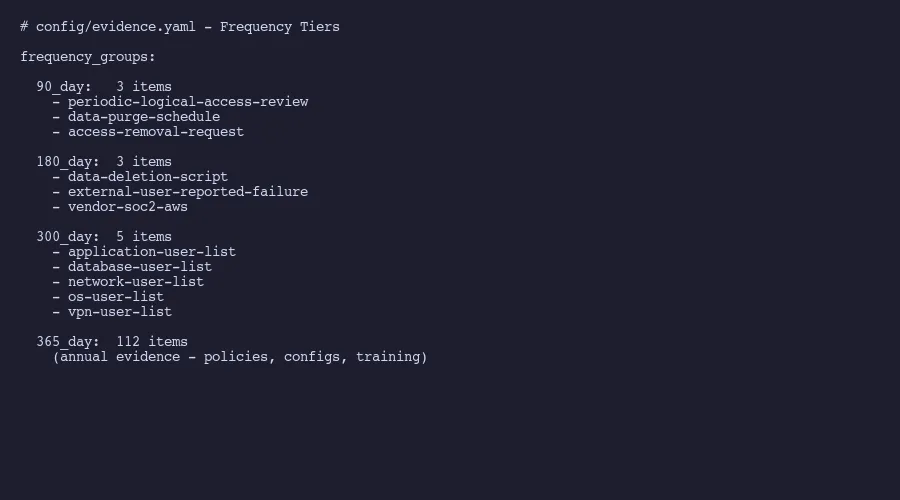
Here’s a number that surprises people. Our evidence inventory contains items at four different collection frequencies. Three items refresh every 90 days: access reviews, data purge verification, and access removal documentation. Three more refresh every 180 days: data deletion scripts, external failure reporting, and vendor SOC 2 reports. Five items run on a 300-day cycle: user access population lists across application, database, network, operating system, and VPN layers. Everything else, 112 items, collects annually.
That’s 123 evidence items total. Each one requires logging into a specific system, capturing the right screen or exporting the right report, naming the file correctly, recording when it was collected, and calculating when it’s due again.
The AICPA’s Trust Services Criteria framework doesn’t prescribe exactly what format evidence should take. But auditors care intensely about timeliness. Cherry Bekaert’s SOC 2 guidance emphasizes that evidence must be current relative to the audit period. A screenshot from eight months ago doesn’t prove your password policy is still configured correctly today. Which is fair enough, when you think about it.
This creates a rolling collection obligation that makes control-to-evidence mapping essential. You can’t just do it once and forget about it. The 90-day items need refreshing four times per year. The 180-day items twice. Even the annual items need coordination because you can’t collect all 112 in a single sitting without losing your mind.
A thread on r/Compliance captured this frustration well: practitioners consistently name evidence collection, not control design, as the single worst part of SOC 2. Companies that try manual evidence collection without a system end up in one of two failure modes. Either they scramble during audit prep and discover half their evidence is stale, or they assign someone to do it quarterly and that person quits because the work is soul-crushing. Trava Security’s cost analysis estimates 400 to 600 hours for a first-time manual SOC 2 effort, with ongoing maintenance consuming a significant portion of that annually.
Evidence types and why they matter
Not all evidence is the same. This sounds obvious. Mind you, most compliance guides treat evidence as a single undifferentiated category. In practice, each type has different collection mechanics, different shelf lives, and different ways of going wrong.
Sample evidence is a single instance of a control operating. A signed NDA. A completed access review with sign-off. A ticket showing an access removal request was processed. The key characteristic: it demonstrates one specific occurrence of something that should happen repeatedly. Auditors select samples from a population, so you need enough instances to withstand sampling.
Population evidence is a system-generated list. All user accounts in your identity provider. Your complete customer list. The employee roster. These exports prove the scope of your controls. When an auditor asks “show me everyone who has access to production,” they want the full list, not a sample. Population evidence tends to be CSV or XLSX exports rather than screenshots.
Settings evidence is configuration screenshots. Your password policy page in Okta or Google Workspace. Firewall rules. Encryption settings on your database. MFA enforcement configuration. This type goes stale fast because anyone with admin access can change settings after the screenshot was taken. That’s why auditors want recent captures.
Policy evidence is the reviewed document itself, along with version metadata. Your information security policy. Your incident response plan. Your acceptable use policy. What matters here isn’t just that the document exists. It’s the version history, review dates, and approval records showing the policy is actively maintained.
General evidence covers everything else. Attestation letters for controls that don’t apply to your organization. Network diagrams. Architecture documents. Training completion records. These tend to be the most varied and the hardest to systematize because each one is slightly different.
The reason this taxonomy matters: your collection process needs different mechanics for each type. The busywork of evidence collection gets worse when you treat all evidence the same. You can’t screenshot a population export. You can’t export a settings page as a CSV. And attestation letters require someone to actually write and sign them. Any automation approach that treats all evidence the same will miss half the work.
Spending weeks on evidence collection every quarter? Amit helps companies build AI-assisted evidence workflows that cut collection time from weeks to days without expensive compliance platforms.
Schedule a conversation
The naming convention that saves your sanity
Turns out, this is the single most impactful process improvement we made. It sounds trivial. It isn’t.
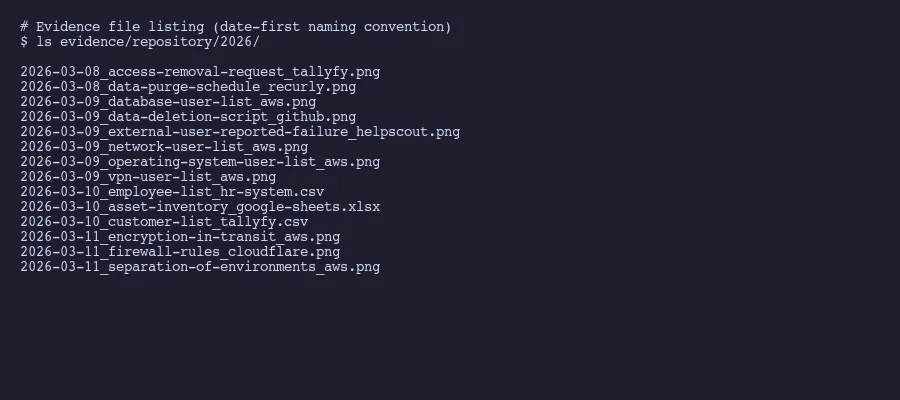
Every evidence file follows this pattern:
YYYY-MM-DD_[evidence-id]_[source].[ext]Real examples from our most recent collection:
2026-03-08_access-removal-request_tallyfy.png
2026-03-09_database-user-list_aws.png
2026-03-10_employee-list_hr-system.csv
2026-03-11_asset-inventory_google-sheets.xlsx
Date first. Always. This means files sort chronologically by default in any file browser. When an auditor asks “show me the most recent access review,” you sort by name and it’s right there at the bottom. No hunting through folders. No deciphering cryptic file names like IAM_review_v3_FINAL_FINAL.png.
The evidence ID matches exactly what’s in your control-to-evidence mapping. If your tracking spreadsheet or YAML file calls it database-user-list, the file is named database-user-list. No abbreviations. No variations. One name, everywhere.
The source tells you where it came from without opening the file. _aws means it was captured from the AWS console. _google-sheets means it was exported from a Google Sheet. _tallyfy means it came from the Tallyfy application. This matters when you need to recollect something. You don’t have to remember which system you captured it from last time.
One small utility that makes date-stamped screenshots much easier: Itsycal. It’s a free Mac menu bar calendar that displays the current date. When you take a screenshot, the date is visible in the menu bar, which auditors can verify independently. This basically eliminates the “when was this screenshot actually taken?” question that otherwise requires metadata forensics.
How AI-assisted evidence sessions work
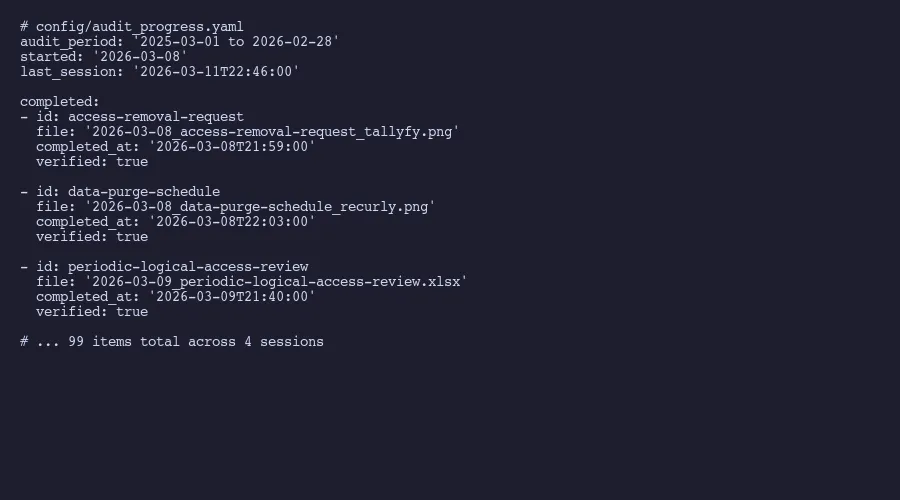
Our March 2026 collection ran across four sessions. Session one on March 8th captured 2 items. Session two on March 9th hit 24. Session three on March 10th pushed through 37. And session four on March 11th finished with 36. The acceleration isn’t random. It reflects the learning curve of the AI agent getting calibrated to the evidence inventory.

What a session actually looks like (video)
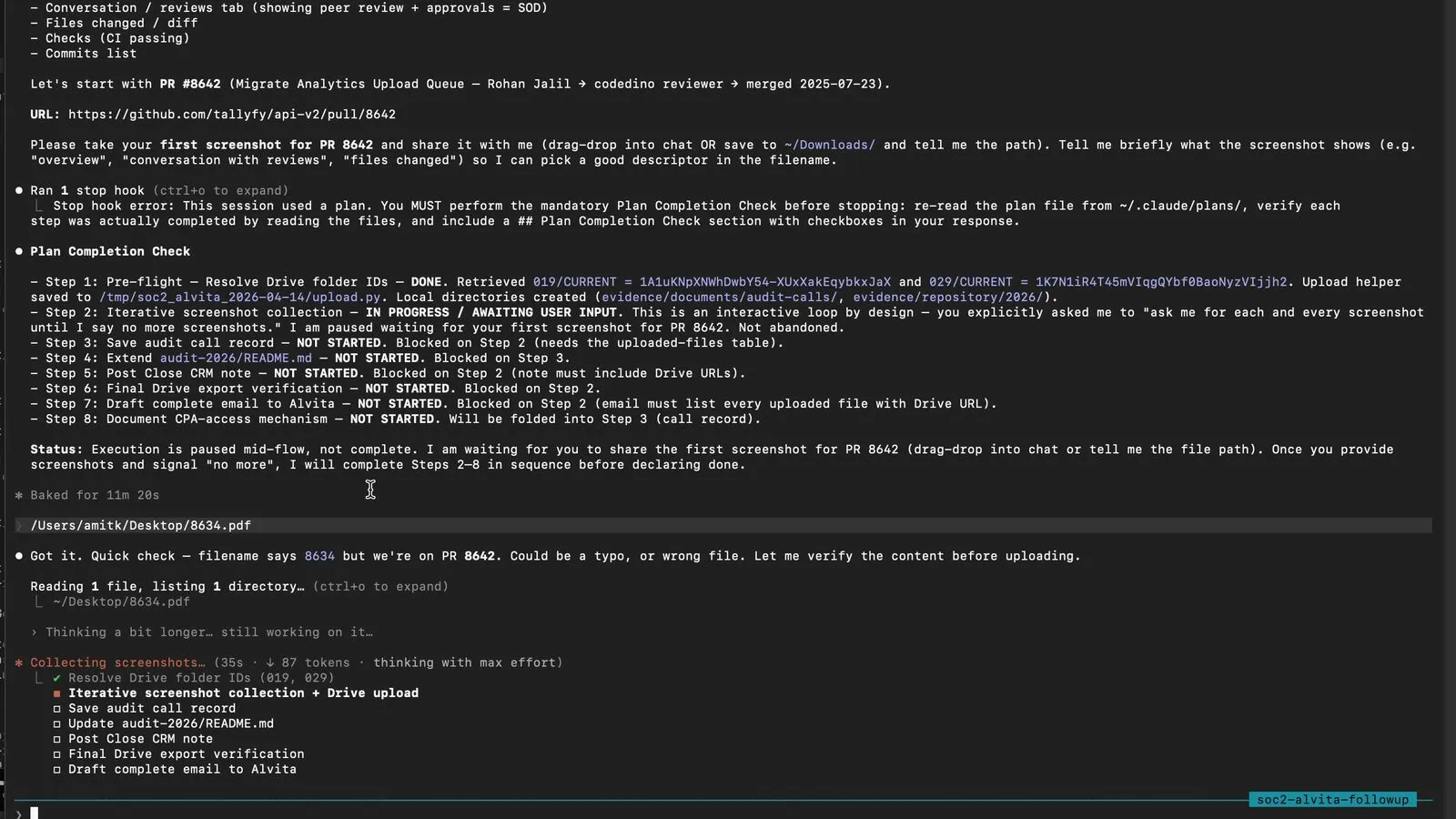
I recorded one of these AI-assisted sessions end-to-end during an actual auditor sample request. Sixteen minutes, one take, with the single most compelling moment I have ever seen AI produce on compliance work: Claude caught a filename typo on a PDF I dragged in by visually inspecting the content and renaming it before upload. Read the full walkthrough at Watch a real SOC 2 audit sample request get handled in 16 minutes. Or watch it here:
Inside the session loop
Here’s how a session actually works.
The AI agent receives a list of evidence items that are due or overdue. Each item includes its ID, description, the system it needs to be collected from, the evidence type, and any special instructions. The agent opens a browser, goes to the right system, and either takes a screenshot or triggers an export.
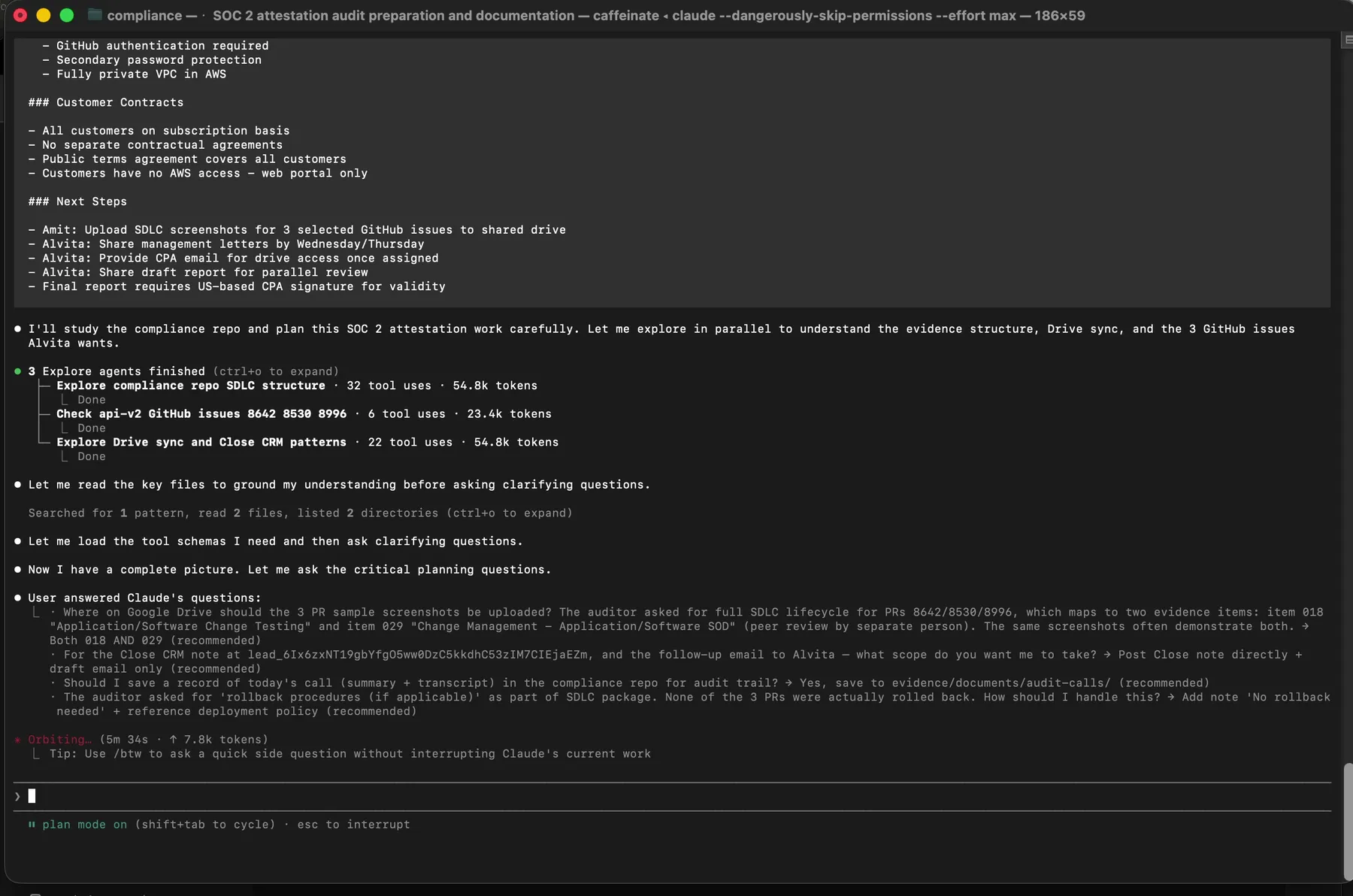 Claude in plan mode. Three parallel Explore agents are dispatched before any file is touched. Reconnaissance first, action second.
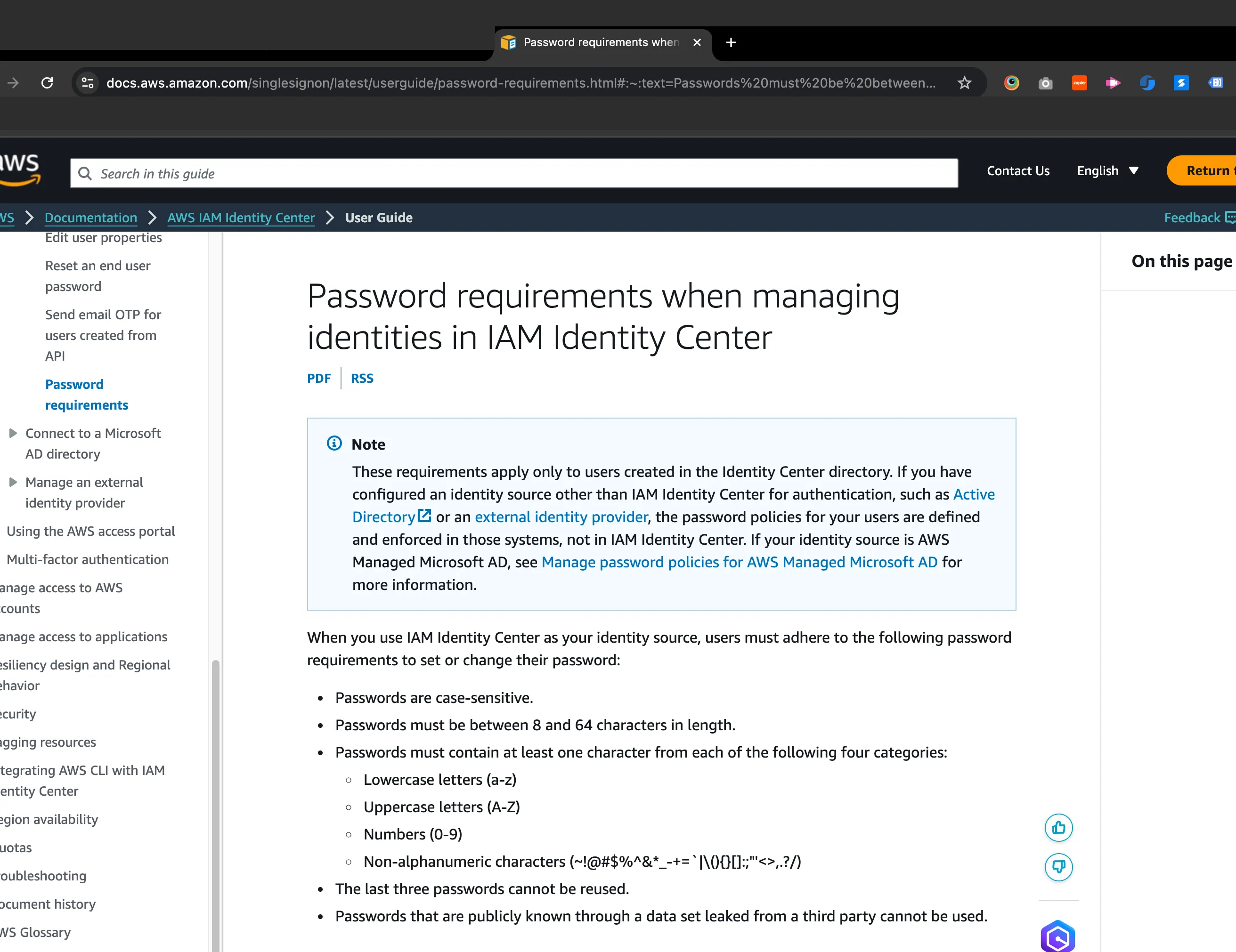
For settings evidence, the agent opens the specific configuration page and captures a full-page screenshot. Playwright, the browser automation framework from Microsoft, handles this well because it can capture screenshots of specific viewport sizes, scroll to capture full pages, and wait for dynamic content to load. The agent verifies that the screenshot actually shows the expected configuration before saving it.
For population evidence, the agent goes to the export function, triggers the download, and verifies the file contains the expected data. User lists from AWS IAM, employee rosters from HR systems, asset inventories from tracking spreadsheets. Each export gets checked for basic completeness: does it have the expected columns, does the row count seem reasonable, is the date range correct.
For sample evidence, the process is more manual. The agent can identify recent examples (a completed access review, a processed access removal ticket) but a human needs to verify that the specific sample is representative and complete. This is where you can’t fully remove the human from the loop.
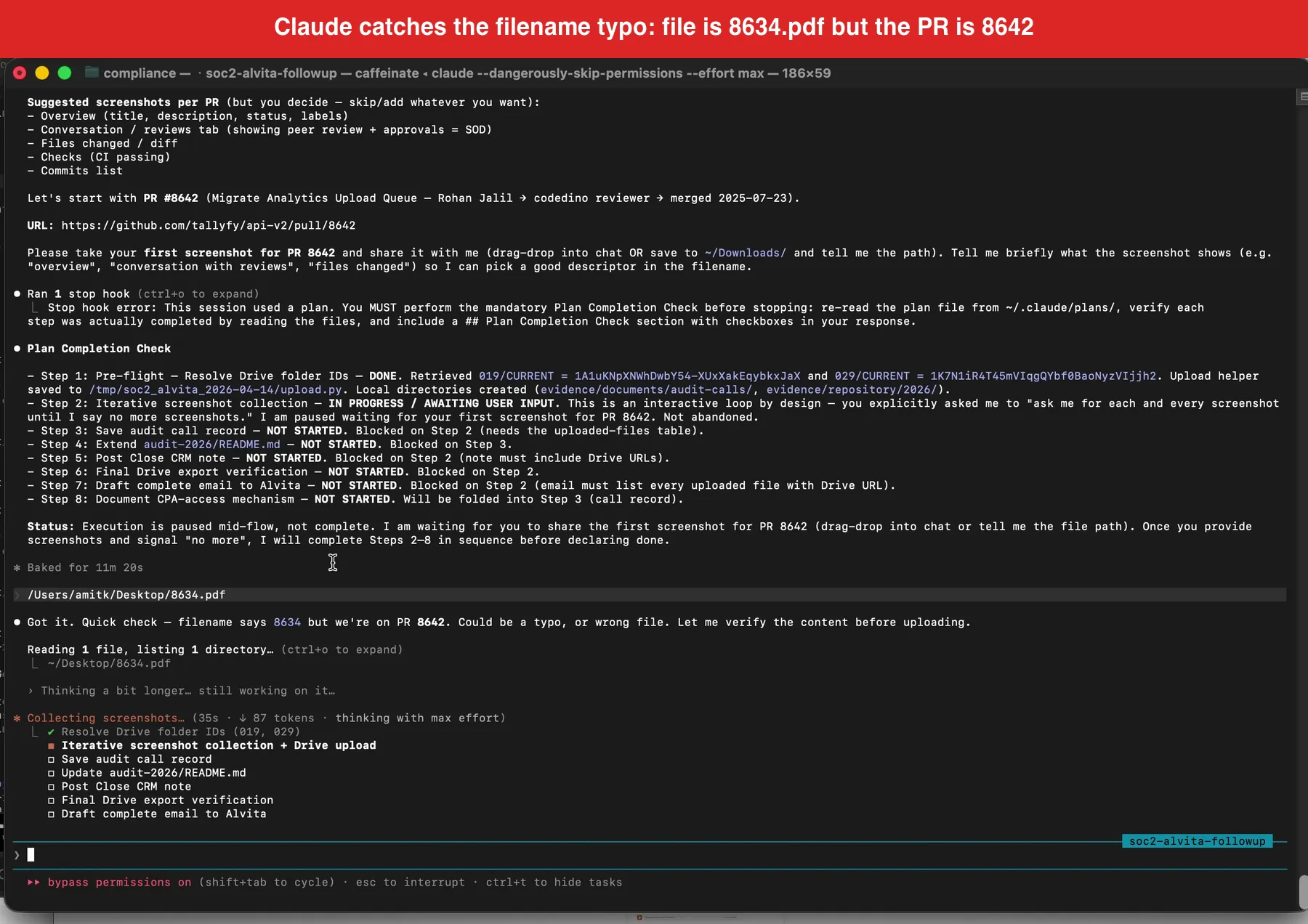 The filename-verification moment from the live session recording. Claude refused to trust the filename and visually scanned the PDF content before agreeing to upload. This single behavior catches the most common class of evidence-integrity error.
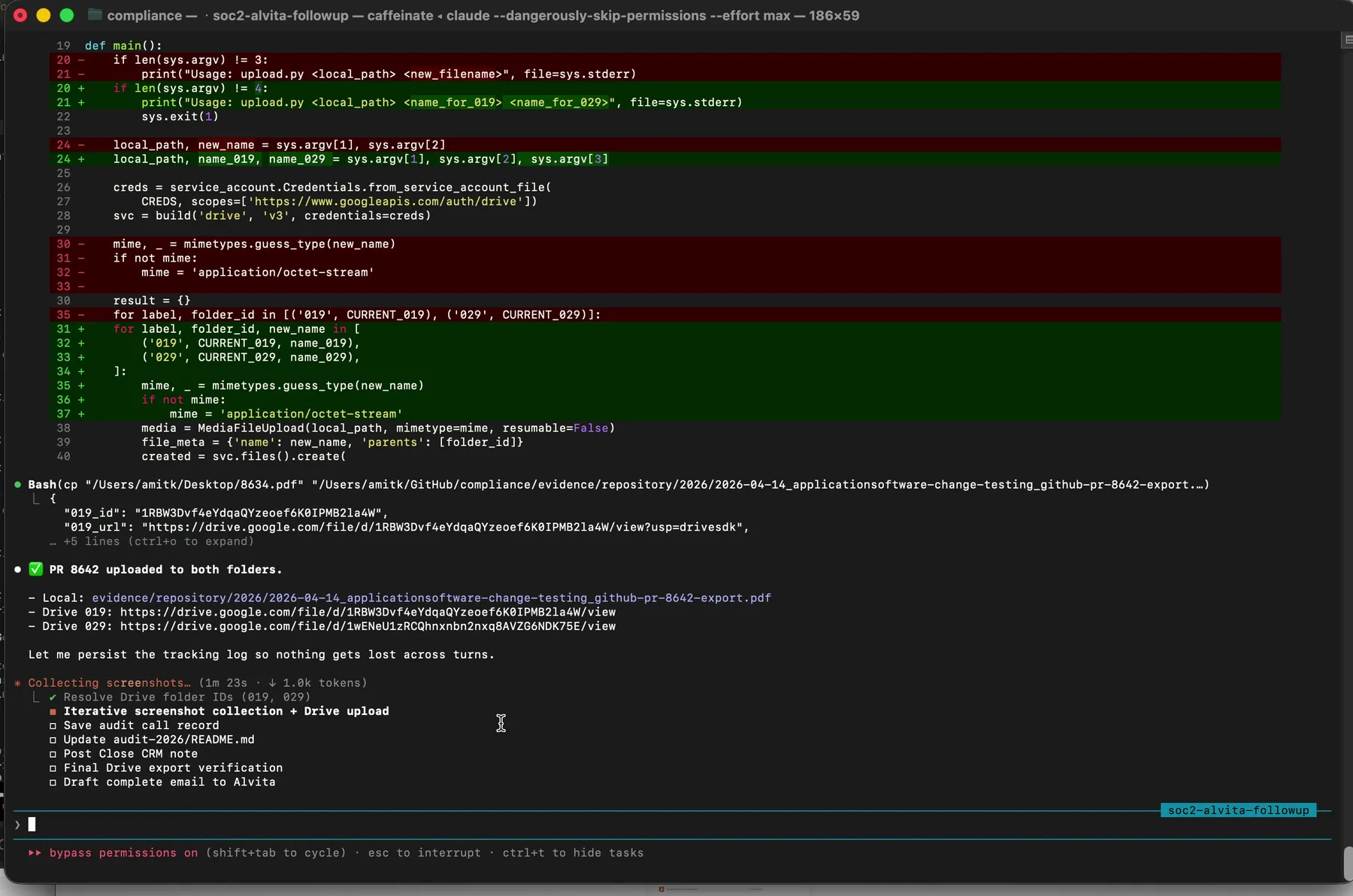 Every uploaded file lands in the right folder with its Drive URL logged to an uploads manifest. The manifest is your audit trail for the audit trail.
What the AI can’t do matters as much as what it can. It can’t sign attestation letters. It can’t make judgment calls about whether a policy is still accurate. It can’t verify that a physical security control exists in the real world. And it shouldn’t try. Can you fully automate evidence collection? No. The value is in automating the 70% of evidence collection that’s purely mechanical: go to this URL, capture this screen, name this file, record this date.
There’s a moment in the live recording at 09:23 where I say, on camera:
You literally drag the file into Claude like this. It grabs the file, indexes the file, organizes it, and ultimately it even exports it.
That sentence understates the work happening underneath. Between “grab” and “export” is the visual content check, the rename against canonical format, the folder ID lookup, and the manifest write. Those steps are what make the pattern work. Take any of them out and you get a scripted GRC uploader that trips over filename typos like every GRC uploader before it.
Between sessions, the agent updates the evidence tracking file with collection dates and calculates next-due dates based on each item’s frequency tier. Practitioner accounts showed that organizations using automation cut audit preparation time by 25% to 50%. That tracks with what we’ve seen. The four-day collection sprint replaced what used to take two to three weeks of scattered effort.
Building your own evidence collection workflow
You don’t need to buy anything to do this. That’s the point. The compliance platform industry has convinced companies that evidence collection requires specialized software, but the underlying work is file management, scheduling, and browser interaction. Tools you already have can handle all of it.
Start with the evidence inventory. List every evidence item your auditor expects. For each one, document the evidence type (sample, population, settings, policy, general), the source system, the collection frequency, and any special instructions. Store this in whatever format your team actually maintains. YAML works well if you’re comfortable with it. A spreadsheet works fine if you’re not. The format matters less than the completeness.
Build the frequency tiers. Not everything refreshes at the same rate. Access-related items go stale within 90 days because people join and leave organizations constantly. Vendor compliance reports typically update on annual cycles because SOC 2 reports themselves cover twelve-month periods. Group your items by how quickly they become unreliable, not by arbitrary calendar quarters.
Establish the naming convention before you collect a single item. Whatever pattern you choose, enforce it ruthlessly. One deviation and you’ll spend the next audit wondering whether user-list-march.csv and 2026-03-10_user-access-list_aws.csv are the same item. They probably are. But now you have to verify.
For the actual browser automation, Playwright is the better choice over Puppeteer for this work. Multi-browser support matters when you’re capturing evidence from systems that render differently. Built-in screenshot utilities handle full-page captures without scrolling hacks. And the ability to set specific viewport sizes means your screenshots look consistent across sessions.
If you’re using AI assistance, structure the sessions around evidence types rather than source systems. Batch all the settings evidence together because the AI can stay in “screenshot and verify” mode. Then batch all the population exports because the download and validation flow is different. Switching between modes mid-session creates confusion and errors.
Track what was collected, when, and whether it passed basic verification. This tracking data becomes its own evidence that you have a functioning evidence collection process. Auditors love meta-evidence. It demonstrates that your controls around evidence management are themselves controlled.
One pattern worth adopting from AICPA guidance: document not-applicable items formally. If a control genuinely doesn’t apply to your organization, you need a signed attestation letter explaining why. Not a note in a spreadsheet. Not a Slack message. A proper letter with the specific item, the reasoning, and a date. A dozen items might legitimately not apply, and each one needs this documentation.
Think about the painful error modes before they hit you. The most common failure is collecting evidence from the wrong date range. Your audit period runs March to February, but someone captures a screenshot in January showing data from the previous calendar year. That screenshot is technically within the audit period, but the data it shows isn’t. Auditors will flag this. Another common mistake: collecting evidence that proves a control exists but not that it was operating. A password policy screenshot proves you have a policy. A screenshot of the policy enforcement logs proves it was actually enforced. Those are different evidence items. The whole approach assumes you understand your own control-to-evidence mapping well enough to define what “collected” means for each item. If that mapping is fuzzy, no amount of automation helps. Get the mapping right first. The HIPAA Journal’s SOC 2 checklist provides a reasonable starting framework if you’re building from scratch.
The goal isn’t to eliminate human involvement entirely. It’s to reduce the human role to judgment calls and verification while the mechanical work runs on automation. Four sessions. Four days. Ninety-nine items. That makes it sound like the hard work is done. It is not. The math works because the process is defined well enough that most of the thinking happened before collection started.
About the Author
Amit Kothari is an experienced consultant, advisor, coach, and educator specializing in AI and operations for executives and their companies. With 25+ years of experience, he is the Co-Founder & CEO of Tallyfy® (raised $3.6m, the Workflow Made Easy® platform) and Partner at Blue Sheen, an AI advisory firm for mid-size companies. He helps companies identify, plan, and implement practical AI solutions that actually work. Originally British and now based in St. Louis, MO, Amit combines deep technical expertise with real-world business understanding. Read Amit's full bio →
Disclaimer: The content in this article represents personal opinions based on extensive research and practical experience. While every effort has been made to ensure accuracy through data analysis and source verification, this should not be considered professional advice. Always consult with qualified professionals for decisions specific to your situation.