If you remember nothing else:
- The Claude Team plan runs to 150 seats. Hitting 50 does not push you onto Enterprise.
- The 50 seat figure is the sales-assisted Enterprise minimum, not a Team ceiling.
- The upgrade is a features decision. Custom roles, the Compliance API, custom retention, and SCIM are the real reasons.
- Some things that used to be Enterprise-only, like the bigger context window and bundled Claude Code, now reach Team too.
Plenty of Anthropic Team admins hit the high 40s in seats and start budgeting for an Enterprise migration. Forty-seven seats, the 50-seat number everyone repeats, time to move. It is a reasonable read of the marketing language, and it is wrong. The Claude Team plan runs to 150 seats, and the 50-seat figure is something else.
If you run Anthropic Team at any scale and the Enterprise upgrade is on the table, here is the short version. You are probably less boxed in than it feels, and the decision you actually face is about features, not headcount.
The 50-seat myth
Anthropic publishes two numbers that get conflated. The Team plan supports two to 150 seats, with a hard ceiling at 150. The Enterprise plan has a minimum of 20 seats self-serve, or 50 seats sales-assisted. The sales-assisted route is the one that opens multi-currency billing, arrears invoicing, and custom contract terms. Eligible organizations can now get a HIPAA BAA on either route.
So the 50-seat number is the sales-assisted Enterprise minimum. It is the floor for one way of buying Enterprise. It is not a trapdoor under your Team plan. Cross 50 seats and nothing happens to your Team account. You keep going, comfortably, to 150.
That one correction, surfaced before the Anthropic call, is worth the whole exercise. Lots of orgs reach the high 40s and feel cornered when they have headroom they did not know about. The only seat-driven forced move is crossing 150, and most mid-market orgs are nowhere near it. Everything below that line is a choice, and the choice is about what Enterprise does that Team cannot.
What Enterprise actually adds
Filter the brochure down to the differences that change how you operate, and a shorter list is left. Here are the two plans side by side, including the rows where they match.
| Capability | Team | Enterprise |
|---|---|---|
| Seat range | 2 to 150 | 20 self-serve, 50 sales-assisted, no documented ceiling |
| SSO | Included, SAML | Same |
| SCIM provisioning | No | Yes |
| Roles | Built-in roles only | Built-in plus custom fine-grained roles |
| Data retention | 30 days, fixed | Configurable, per-project overrides |
| Zero Data Retention | No | Yes, for Claude Code |
| Audit | No audit logs | Full audit dashboard plus Compliance API |
| Managed MCP | Yes, via server-managed settings with allow and deny lists | Same |
| Context window | Up to 1M, varies by model | Same |
| Claude Code | Included with every seat | Included with every seat |
| Claude in Chrome site controls | Allowlist and blocklist, generally available | Same, plus per-role allowlists |
| Claude Security scanning | Said to be coming | Public beta now |
| HIPAA BAA | Not available | Available, self-serve or sales-assisted |
| SOC 2, ISO 27001, ISO 42001 | Yes | Yes |
| FedRAMP | No | No |
| Support | Email and ticket | Dedicated CSM (sales-assisted), priority |
| Migration | n/a | In-place, zero data loss, one-way |
A few of these carry most of the weight.
The Compliance API is the first. Enterprise exposes programmatic access to audit logs for SIEM ingestion and automated policy checks. Team has no audit logs and no API. If your security team wants Claude usage flowing into the same pipeline as everything else, that is an Enterprise line item, and it sits next to the wider question of governing AI-generated code at scale.
Custom roles are the second. Team has four built-in roles and global connector toggles. Enterprise lets you build a Finance role, a Legal role, and a Sales role, each with its own connector set, retention window, and tool access, all inside one tenant. Any org with three or more teams that need different policies runs into the Team ceiling here fast.
Then there is the quieter set that matters in regulated shops: custom data retention beyond 30 days with per-project overrides, Zero Data Retention for Claude Code, SCIM provisioning for real identity-provider sync, and, on the sales-assisted route, a named Customer Success Manager instead of a ticket queue. Newest is Claude Security, Anthropic’s code-scanning tool that moved to public beta for Enterprise at the end of April 2026, with Team and Max said to be coming.
The admin sidebar is the quickest way to see where those differences live. Read it for what it groups rather than as a scorecard, though, because a Team admin sees a version of most of these pages too. What changes on Enterprise is what you can express inside them, and the two entries at the foot of the list are where most of that lives.
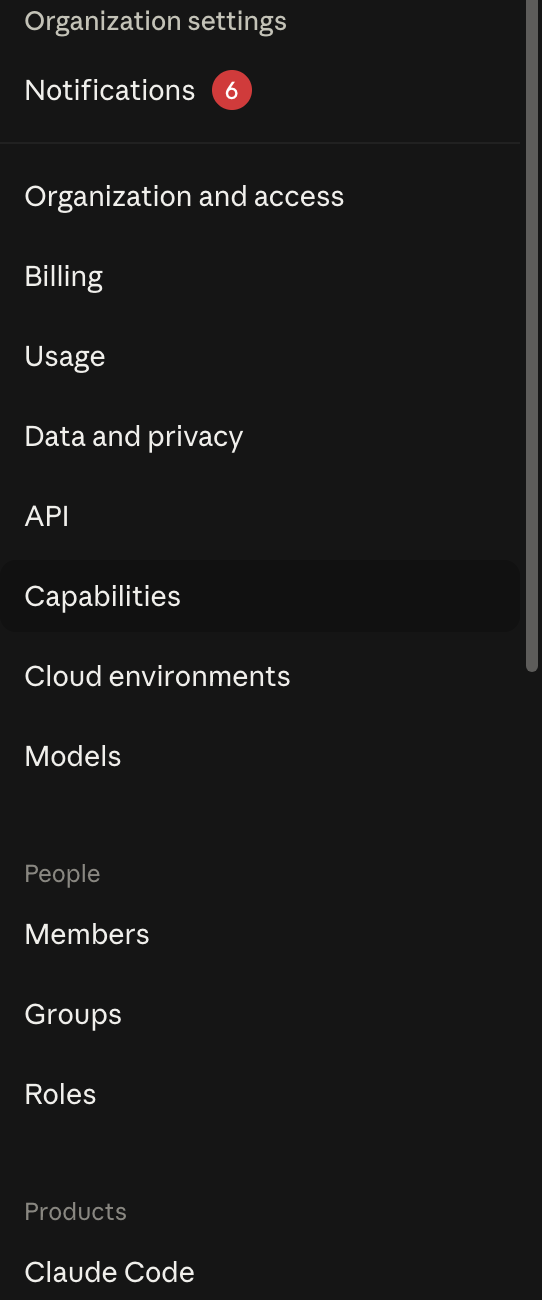
Count the rows above People. Organization and access, Billing, Usage, Data and privacy, API, Capabilities, Cloud environments, Models. Then Members, Groups and Roles take a section of their own, which is the custom-role argument above rendered as navigation. Roles is a first-class object here, not a dropdown hanging off a user record, and that structural difference is what makes a Finance policy and an engineering policy able to coexist in one tenant.
What stopped being an Enterprise reason
Here is where older comparisons mislead, including some I had written down myself before I rechecked. Four things that used to be Enterprise-only have quietly reached Team.
The context window is the clearest. Anthropic now serves a window of up to 1M tokens on every paid plan, varying by model, in chat as well as in Claude Code. Team is not capped at 200K anymore. If someone tells you a bigger window needs Enterprise, that stopped being true.
Claude Code itself is the second. It now comes with every Team seat, not gated behind a premium tier. The old cost argument, where you paid a steep premium per power user on Team and Enterprise won on bundling, no longer holds for new plans.
Site controls for Claude in Chrome are the third. Admin allowlists and blocklists are generally available on both Team and Enterprise now. The default category blocks, financial sites among them, can be managed by admins on either plan. The piece that stays Enterprise-flavored is per-role allowlisting, and only because per-role anything depends on custom roles. Worth confirming the current state on your call rather than trusting a months-old blog post, this one included.
Managed MCP is the fourth, and the big one for any org running Claude Code at scale. Admins can ship a managed-mcp.json to the device fleet through Intune, Jamf, Kandji, or GPO that fixes which MCP servers every developer gets. Developers cannot register around it. If API-key sprawl or supply-chain risk keeps you up at night, this is the control point, and it pairs with Claude Code’s enterprise security model for the local side of the same problem. Anthropic’s server-managed settings now deliver the allowedMcpServers and deniedMcpServers policy keys from the claude.ai admin console, on Team as well as Enterprise, so a Team admin can lock down which MCP servers developers connect to. The device-level managed-mcp.json file is gated by whether you run device-management tooling, not by your Claude plan.
Migrating from Team to Enterprise
The upgrade happens in place. Conversations, projects, and memberships carry over with zero data loss. DNS verification re-runs, which takes a day or two for SSO. Some features default to off afterward, so you re-enable what you need. Users show up as Unassigned at first, so you assign seats on day one. Unused Team credits roll over.
The part that matters: the migration is one-way. Once you flip to Enterprise, you do not flip back. For an org with live SSO and active Claude Code usage, a week or two from signature to a working Enterprise tenant is typical. Schedule the cutover for a Friday so DNS propagation lands over a weekend.
When it is worth it

Strip it to a few rules.
Stay on Team if you are under 150 seats and none of the Enterprise-only features are load-bearing for your governance. Most teams running Claude as a productivity tool, even large ones, live here happily. If you’re not on Team at all and your staff put client data through consumer Max plans, I looked at whether that’s safe and how the cost compares.
Move to Enterprise when one of these is true. You have a security team that needs SIEM integration through the Compliance API. Three or more teams that need different policies. A legal team with retention requirements past 30 days. A HIPAA workflow on the horizon. Any single one can justify the move on its own.
The cost question is separate, and it deserves its own look. How each plan bills usage changes which one is cheaper at your scale: every Team member has their own usage limit that can’t be shared, while Enterprise has no per-seat limit and bills all usage to the organization at API rates. I worked through that math in a separate piece on how Claude bills extra usage. Rate limits are the other thing Anthropic does not publish per plan, so if your usage runs hot, ask about enterprise rate limits and committed spend directly.
Enterprise also buys you an admin console with a great deal in it, and I mapped the whole tree if you want to see what you would actually be administering before you agree to administer it.
When you get on the call, go in with questions that need written answers, not slides. Download the question list to bring to that call and adapt it to your shop. My take after rechecking everything: Enterprise earns its keep for most orgs that have already standardized on Claude and have real governance needs. If you do not have those needs yet, Team at 150 seats is a lot of runway.