
SOC 2 policies as code: markdown, version control, and automated PDF generation
Word documents fail at compliance. We manage 31 SOC 2 policies as markdown files in a Git repository with YAML frontmatter, automated version bumps, and WeasyPrint PDF generation. The auditors get professional PDFs. We get a sane workflow.

Key takeaways
- Three-format pipeline - source DOCX for editing, markdown for AI processing, PDF for auditor delivery
- Version control replaces manual tracking - git blame shows who changed what, git log shows version history
- 31 policies managed as code - each with YAML frontmatter tracking version, review date, TSC mappings
- Automated PDF generation - WeasyPrint converts markdown to professional branded PDFs
Our policies live in a Git repository. Half the auditors blink. The other half ask how we track versions.
The answer is the same answer every software team already knows: git log. Every change to every policy at Tallyfy is a commit with a timestamp, an author, and a message explaining why. No “final_v3_FINAL_revised.docx” floating around in email threads. No wondering which version the auditor reviewed last year. The commit history is the version history.
This isn’t theoretical. We manage 31 SOC 2 policies this way. Each one has structured YAML metadata that machines can parse. Each one generates a branded PDF for auditor delivery. The whole thing runs on tools that cost nothing. And it’s part of how we replaced our SOC 2 compliance platform entirely.
Why Word documents fail at scale
Every compliance team starts with Word. It makes sense at first. Your lawyer writes the initial policies in Word. Your auditor reviews Word documents. Microsoft tracks changes. What could go wrong?
Everything, eventually.
The fundamental issue is that Word documents are opaque binary blobs. You can’t diff them meaningfully. You can’t search across 31 documents with a single command. You can’t extract metadata programmatically. You can’t pipe them into an AI model for analysis without conversion steps. And version control in Word remains one of the trickiest challenges of modern collaboration, whether for startups or large organizations.
Here is what actually happens in practice. Someone emails “Password Policy v2.1” to three people for review. Two of them edit their copies. One emails back “Password Policy v2.1 - JM edits.” The other saves their version to a shared drive with the same filename. Now you have three divergent versions and no clean way to reconcile them. Multiply this across 31 policies and annual review cycles. The mess compounds.
Beyond the version chaos, Word documents resist automation. You can’t write a script that opens every .docx, reads the review date from the header, and flags overdue policies. Well, you can, but it involves parsing XML inside ZIP archives. Compliance teams shouldn’t need to do that.
Git solved this problem for source code decades ago. The same principles apply perfectly to compliance documents. Every change is tracked. Branching lets multiple reviewers work without conflicts. Merging reconciles edits cleanly. And the entire history is immutable and auditable.
StrongDM recognized this early when they open-sourced Comply, a SOC 2 compliance framework built around markdown policies stored in Git. Their insight was straightforward: compliance documentation is just structured text, and structured text belongs in version control.
The three-format pipeline
We don’t store policies in just one format. We maintain a pipeline with three stages, each serving a different purpose.
DOCX is the editing format. When a policy needs substantive revision, the person doing the editing works in Word or Google Docs. Legal counsel, HR, and non-technical stakeholders all know how to use a word processor. Asking them to learn markdown syntax is a fight not worth having.
Markdown is the working format. Once edits are finalized, the content gets converted to markdown with YAML frontmatter. This is the canonical version. It’s what lives in Git. It’s what gets version-tracked, diffed, searched, and processed by scripts. Markdown is plain text, which means any tool on earth can read it.
PDF is the delivery format. Auditors expect polished documents. They don’t want to read raw markdown or poke around a Git repository. So we generate branded, professional PDFs from the markdown source. Letter-size pages. Company logo. “CONFIDENTIAL” header on every page. Page numbers. A revision history table. The output looks like it came from a compliance platform. It came from a Python script.
The flow is always one direction during a review cycle: DOCX for human editing, then markdown for storage and processing, then PDF for distribution. The markdown version is the single source of truth. Everything else is either upstream input or downstream output.
This three-format approach solves a real tension. Compliance work requires both human-friendly editing and machine-friendly processing. Trying to do both in Word means you get neither done well. Trying to force everyone into markdown-only editing means your legal team ignores the process. The pipeline respects how different people actually work.
Policy metadata that machines can read
The real power of markdown policies isn’t the prose content. It’s the YAML frontmatter.
Every one of our 31 policies starts with a structured metadata block:
---
id: acceptable-use-policy
title: Acceptable Use Policy
version: "1.1"
last_reviewed: "2025-12-16"
next_due: "2026-12-16"
owner: Security Team
soc2_criteria:
  - CC1.2
  - CC1.4
  - CC6.1
  - CC6.2
  - CC7.2
---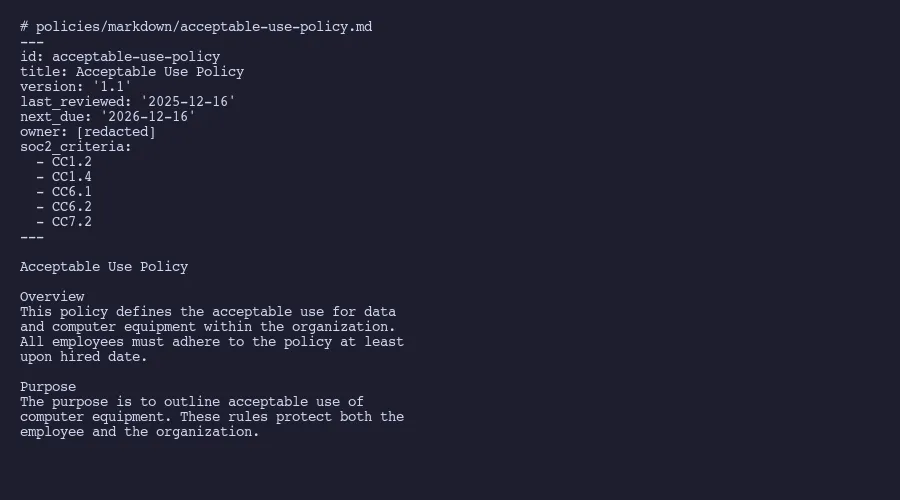
That small block of YAML does an enormous amount of work. The id field gives every policy a stable, URL-safe identifier. The version field follows semantic versioning, so 1.1 to 1.2 means a minor update and 1.x to 2.0 means a major rewrite. The last_reviewed and next_due dates make it trivial to write a script that flags overdue reviews. And the soc2_criteria array maps each policy directly to AICPA Trust Services Criteria.
That last field is particularly valuable. The same approach powers our control-to-evidence mappings, creating a queryable chain from criteria through controls to evidence. When an auditor asks “Show me all policies relevant to CC6.1,” a single grep across frontmatter answers the question in seconds. No clicking through a compliance platform interface. No manual cross-referencing.
YAML frontmatter is a well-established pattern used by static site generators, documentation systems, and content management tools. Placing metadata at the top of the document keeps information about the document attached to the document itself. The document is self-describing. You don’t need an external database or spreadsheet to know when a policy was last reviewed or which SOC 2 criteria it satisfies.
Here is a sampling of the 31 policies we manage this way:
- Acceptable Use Policy (CC1.2, CC1.4, CC6.1, CC6.2, CC7.2)
- Anti Bribery Policy (CC1.1, CC1.2)
- Asset Inventory Policy (CC6.1, CC6.6)
- Change Management Policy (CC8.1)
- Data Backup and Restoration Policy (A1.2, A1.3)
- Data Classification Policy (CC6.1, CC6.5, C1.1)
- Disaster Recovery and Business Continuity Plan (A1.1, A1.2, A1.3)
- Information Security Policy (CC1.1, CC1.2, CC5.2)
- Logical Access Policy (CC6.1, CC6.2, CC6.3)
- Password Policy (CC6.1, CC6.2)
- Security Incident Response Policy (CC7.3, CC7.4, CC7.5)
- Vendor Management Policy (CC9.2)
Every policy maps to at least one criterion. Some span five or more. The YAML makes these relationships queryable, which is a word I’m using deliberately. When your policies are structured data, you can run queries against them the way you’d query a database. “Show me all policies that haven’t been reviewed in 11 months.” “List every policy touching CC6.x criteria.” “Which policies does the Security Team own?” These questions get answered with a short script, not a manual audit of 31 separate documents.
Automated version bumps and review tracking
The AICPA expects policies to be reviewed at least annually. Our auditor verifies this during every engagement. The evidence they need is straightforward: proof that each policy was reviewed, when it was reviewed, and what changed.
In a Word-based workflow, this means opening each document, updating the revision history table manually, changing the version number in the header, saving, and hoping nobody overwrites your changes. Across 31 documents, that’s a full day of mind-numbing clerical work.
We automated it. A Python script handles the annual review process:
# For each policy markdown file:
# 1. Parse YAML frontmatter
# 2. Increment version: 1.1 -> 1.2
# 3. Set last_reviewed to current date
# 4. Set next_due to current date + 365 days
# 5. Append row to revision history table in document body
# 6. Write updated file
The script runs once per review cycle. It touches all 31 policies in seconds. The git commit captures exactly what changed. The commit message says something like “Annual policy review December 2025 - all 31 policies reviewed.” And because Git provides an append-only, cryptographic audit trail, that commit is immutable evidence of when the review happened.
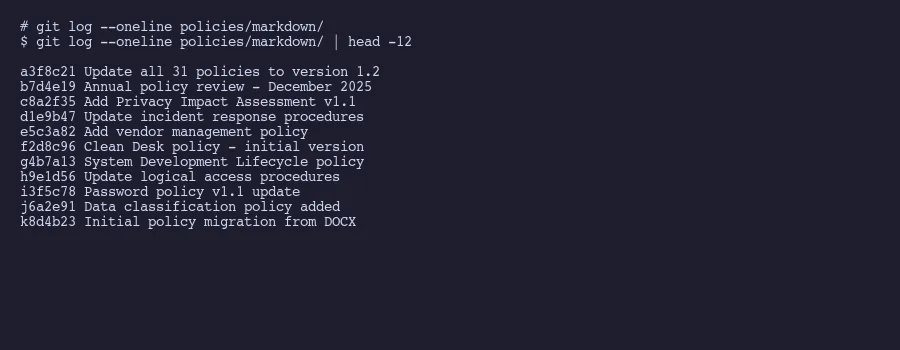
This is where git blame becomes a compliance tool. Run git blame password-policy.md and you see exactly who changed each line and when. Run git log --oneline password-policy.md and you get the complete revision history. These aren’t approximations or activity logs from a SaaS platform. They’re cryptographically signed records of exactly what happened to the file.
All 31 of our policies were reviewed in December 2025. Next review is December 2026. The script will run again, bump every version, update every date, and create one clean commit. The auditor will see the diff and the timestamp. That’s the evidence. Simple.
One thing that often gets overlooked in policy management: the review schedule itself should be tracked in the same repository. We keep a review-schedule.yaml that lists every policy, its current status, and its next due date. A CI script can check this file and send alerts when reviews approach. No separate reminder system needed. No compliance platform calendar. Just a YAML file and a cron job.
The platform engineering community has formalized this concept as “policy as code.” The core idea is that compliance rules belong in version-controlled, machine-readable formats where they can be automatically validated. We’re applying the same principle to the policies themselves, not just the technical controls.
Generating professional PDFs from markdown
Auditors don’t read Git diffs. They read PDFs. This is non-negotiable.
The generation pipeline is simple. Markdown gets converted to HTML using a standard parser. The HTML gets styled with CSS. WeasyPrint renders the styled HTML to PDF. The entire process is a Python script that runs in under a minute for all 31 policies.
# Pipeline for each policy:
# 1. Read markdown file, strip YAML frontmatter
# 2. Convert markdown to HTML (via markdown library)
# 3. Wrap HTML in a template with CSS styling
# 4. Add header: company name, "CONFIDENTIAL"
# 5. Add footer: page numbers, document version
# 6. Render to PDF via WeasyPrint
# 7. Output: professional letter-size PDF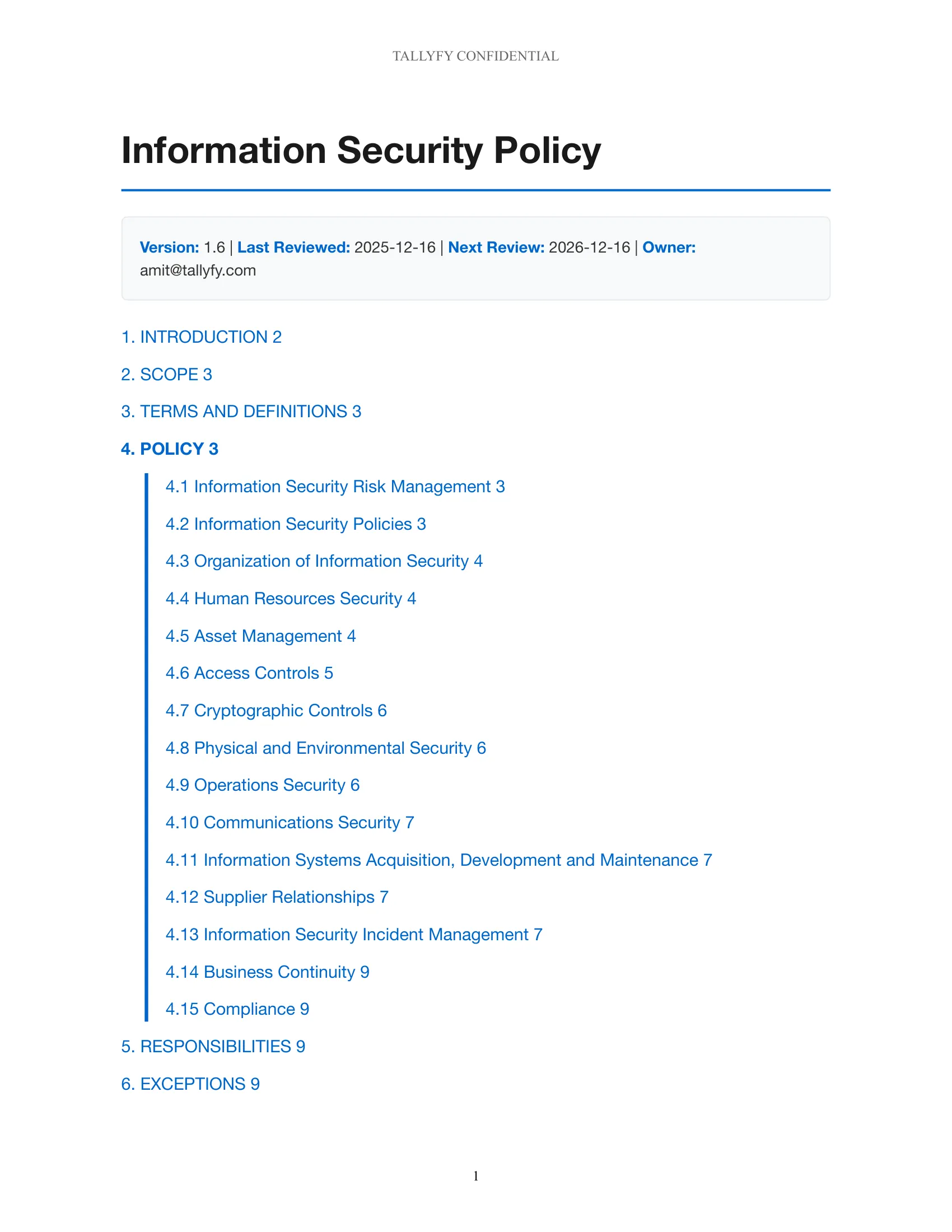
The CSS controls everything. Page size (letter). Margins (1 inch). Font (a clean sans-serif). Header and footer placement. Table styling for the revision history section. Automatic page breaks before major sections. The result looks indistinguishable from something you’d get out of an expensive compliance tool.
WeasyPrint was the right choice for this particular use case. Other tools exist. Pandoc with a LaTeX engine produces beautiful output but requires a full TeX installation. Prince XML is excellent but commercial. WeasyPrint sits in a sweet spot: it’s free, it’s Python-native, it uses CSS for styling which most developers already know, and it handles the compliance document use case well. The markdown-to-PDF pipeline using Pandoc and WeasyPrint together is a pattern well documented by the developer community.
A few details that matter for auditor-facing documents. The “CONFIDENTIAL” header appears on every page automatically through CSS @page rules. The version number from the YAML frontmatter gets injected into the footer so the auditor can verify they’re looking at the current version. The revision history table at the end of each document gets populated from the YAML metadata and from commit history. These aren’t cosmetic touches. Auditors specifically look for version numbers, confidentiality markings, and revision histories.
The generated PDFs go into a Google Drive folder shared with our auditors. That sharing workflow is described in detail in our broader approach to replacing compliance platforms. The auditors see polished, professional documents. We’ve described the full auditor sharing workflow separately. They don’t need to know or care that the source material is markdown in a Git repository. They just need the evidence to be clear, current, and well-organized.
One last practical note. We regenerate all PDFs during every review cycle, even for policies with no content changes. The version bump and review date update mean every PDF reflects the latest review. This eliminates any ambiguity about whether the auditor is looking at a stale document. Fresh PDF, fresh metadata, fresh commit. The pipeline handles this automatically.
The total cost of this setup is zero dollars in software licensing. Python, WeasyPrint, Git, and markdown are all free. The time investment was roughly two days to build the initial pipeline and conversion scripts. Annual maintenance is perhaps an hour to run the review cycle. Compare that to the ongoing cost of a compliance platform subscription and the answer is obvious.
About the Author
Amit Kothari is an experienced consultant, advisor, coach, and educator specializing in AI and operations for executives and their companies. With 25+ years of experience and as the founder of Tallyfy (raised $3.6m), he helps mid-size companies identify, plan, and implement practical AI solutions that actually work. Originally British and now based in St. Louis, MO, Amit combines deep technical expertise with real-world business understanding.
Disclaimer: The content in this article represents personal opinions based on extensive research and practical experience. While every effort has been made to ensure accuracy through data analysis and source verification, this should not be considered professional advice. Always consult with qualified professionals for decisions specific to your situation.